

Job complexity is growing, but the ability to recruit and train the workforce has not kept pace.
With roughly 25% of manufacturing workers nearing retirement, the industry stands to lose invaluable operational expertise over the next decade.
90% of leaders report that skills shortages are impacting productivity. Manufacturing also faces high turnover, with an annual rate of 37%.
With two thirds of companies struggling to retain skilled teams, making consistency in performance a challenge.
Lastly, recruiting has become more difficult. Public perceptions impact recruiting, with 54% of leaders citing a negative image as a recruitment barrier.
It can sometimes take months to get frontline workers up to speed, which is why 50% of companies are investing in knowledge-sharing tools to bridge gaps and appeal to new talent — the time is now.
These challenges make digital work instructions a must have. Clear, accessible guides capture essential knowledge, transfer skills, and support an enabled workforce.
Dozuki has helped companies reduce process documentation time by 50%, driving significant improvements in efficiency, knowledge transfer, and learning initiatives.
.jpg)
Effective work instructions are more than just a documentation tool, they are essential to employee learning and operational excellence. When work instructions are digital, accessible, and user-friendly, they empower employees to quickly acquire new skills, reduce errors, and perform tasks with confidence.
Research shows digital work instructions can enable workers to complete repairs 21% faster and with a 26% lower perceived workload than traditional paper documents. Whether your goals are in production, quality, compliance, or safety, digital work instructions can move the needle.
Chances are, your existing work instructions are text-heavy, paragraph driven documents that are notoriously tough to get through. It’s time to rethink that.
The average American adult reads at a ninth grade level. Be sure to write instructions in plain language and use bullet points, so workers can comprehend quickly and easily.
Always lead with the most important information. Cut out the narratives and anecdotal information to get straight to the meat of your documentation. Bad work instructions are the norm. Documentation is often created to check a box for audit or compliance purposes. Once made, work instructions are stuck in paper binders or buried in complex file systems like Sharepoint.
While companies have some form of documentation, it’s failing to meet the needs of operators, engineers, and managers.
Think of your audience like a classroom full of students. Don’t just demonstrate how a process is supposed to work. Use instructions that teach the reader as they progress through each step.
Break complex procedures down into easily followed steps. If you have too much content for one step, it’s a sign you need to break it up even further. Phrase things like you’re teaching the process to someone who’s never seen it before.
Work instructions can become an integral part of how employees upskill within your organization. Take advantage of your controlled procedures by making them the foundation of your education and training programs.
Access to documentation is the biggest obstacle to an employee’s success. When information is difficult to find, they are discouraged from following established standards and create risk by trying to figure things out on their own.
Work instructions should be simple to find and easy to access in any environment. Those that are tethered to large paper binders, or hidden in complex content management systems, restrict the flow of information.
Make your work instructions as accessible as possible by delivering them in a digital format.
Digital documentation tools are easily searchable and can leverage QR codes to instantly access specific documents. This provides real time savings and ensures that workers on the job have access to accurate information from anywhere.
Whichever format you use to present your work instructions, keep it consistent. It’s not uncommon for authors to use different styles to present information within a company, but it can be prevented.
Stick to an agreed-upon format and follow it.
This allows people to spend less time deciphering the instruction and more time learning how to do the work.
A standardized format also creates a clear baseline for employees to suggest process improvements.
People are visual learners. Supplement written work instructions with visuals to communicate faster and with more accuracy.
Whenever possible, use visuals that demonstrate the action clearly. Images can also be useful in the form of diagrams or schematics.
Videos also help you quickly demonstrate movements that can’t be captured in an image. This also helps mimic and scale one-on-one training environments.
The average American reads at a ninth grade level. Write work instructions that are simple and can be easily understood by a wide audience.
Traditional work instructions get bogged down with technical industry jargon and run-on sentences. It’s time to focus on trimming the fat.
The average person spends just seconds scanning the words on a page, absorbing only about 20% of the text. The more concise you are, the more information employees will retain and apply to their work later.
This also has the added benefit of internationalization. When sentences are simple and clear, they become much easier to translate and share across languages.

Employees frequently have to adapt their workflows to solve day-to-day problems, causing work instructions to quickly become outdated and neglected.
To get more out of your work instructions, make sure all documented procedures reflect the current best practices. Employees need to trust that information is accurate and current. Perform routine audits and ask workers if they’re still following the documented procedures.
By creating work instructions from the floor, it becomes easier to identify inefficiencies and opportunities for improvement in the process.
Regularly capturing and updating knowledge is key to sustaining long-term gains.
Creating digital work instructions can feel like an insurmountable task. Often becoming the bottleneck in achieving a smooth digital transformation.
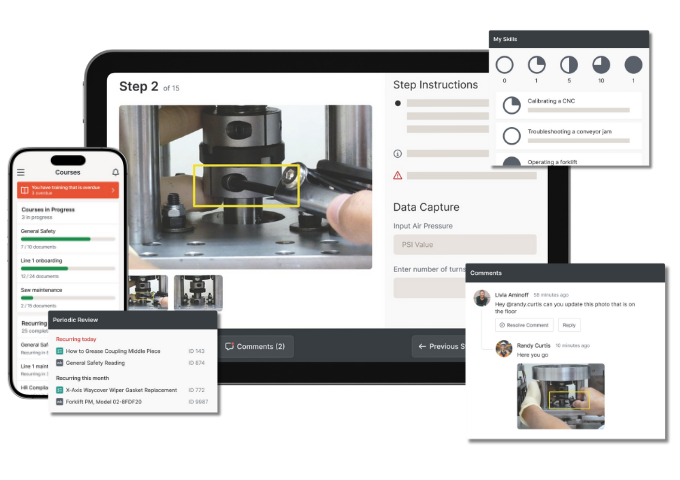
CreatorPro AI from Dozuki accelerates the process of capturing and digitizing frontline operations. What once took months now takes days.
Your teams can digitize knowledge 70% faster, allowing your organization to get real-time value from its digital initiatives that much faster.
Dozuki CreatorPro ensures that essential knowledge is captured quickly, without burdening teams with additional documentation tasks.
Visual Clarity: Dozuki automatically extracts high-quality visuals from the video, including images or diagrams that help illustrate complex steps, making instructions easier to follow and understand.
Seamless Deployment: With the digital instructions in place, you can deploy them directly from the production floor, enabling new hires to be trained faster and ensuring they meet operational, quality, and safety standards from the start.
Multilingual Support: CreatorPro AI can automatically translate the narration in the video into multiple languages, making the documentation accessible to a global workforce. This helps improve communication and ensures compliance, even across diverse teams.

High employee turnover, expanding production lines, and outdated training systems slowed onboarding and workflows at General Mills.
By adopting Dozuki, General Mills not only enhanced productivity but also fostered a more capable and satisfied workforce. At the core of these productivity gains was a foundation of digital work instructions in the Dozuki platform:
New worker training times accelerated by 62%
Sanitation training improved by 66%
Changeover improvements cut downtime by 75%


.png)